Adding SLAIF Scores
Overview
The SLAIF Scores section allows district administrators to manually enter official state-level assessment results for students who are missing data due to transfer, enrollment timing, or other special circumstances. These scores directly affect projections in accountability ratings, including LPS subgroup performance and overall student outcomes.
This feature aligns with the Mississippi Department of Education’s accountability framework and is used to ensure that every eligible student’s data is accurately represented in the system.
Purpose
The SLAIF Scores feature ensures that districts maintain complete, accurate assessment data for all students.
Students may be missing SLAIF scores for several reasons:
- Transferred from another Mississippi public school district
- Did not take a state assessment
- Transferred from out of state, private school, or homeschool
Adding missing SLAIF scores helps:
- Improve the accuracy of projected accountability ratings
- Ensure LPS subgroup data reflects all eligible students
- Maintain compliance with MDE accountability reporting requirements
Access and Permissions
Only district-level administrators can create and manage SLAIF scores.
If you have official score reports for a student but do not have access to this feature, please send the reports to your district administrator for entry.
How to Access and View SLAIF Scores
- Log in to TKG Analytics with your district email credentials.
- From the left-hand navigation menu, locate the section labeled SLAIF Scores.
- Click the green "Click here to view" button next to SLAIF Scores.

If you do not see this option, please contact your district administrator or open a Helpdesk Ticket.
How to Add SLAIF Scores
Once on the SLAIF Scores page, district administrators can add missing scores by following these steps:
-
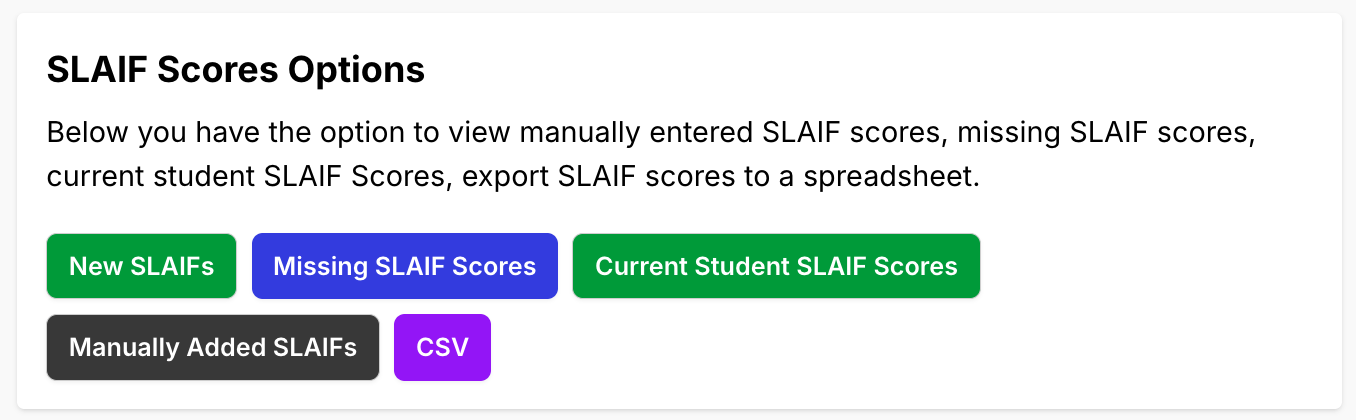
Click the green "New SLAIFs" button in the top-right corner.
-
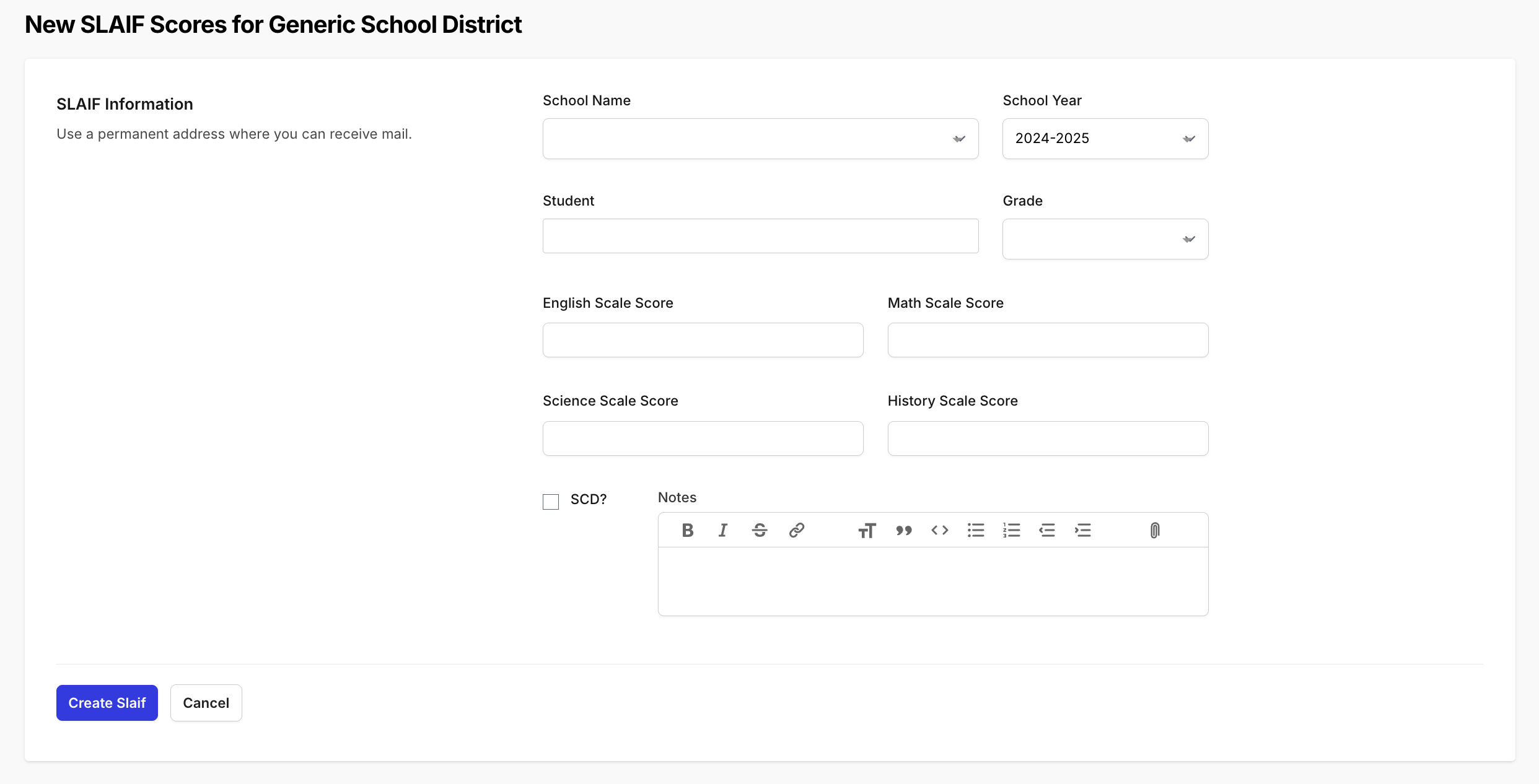
Choose the School.
- Choose the Year.
- Choose the Student.
- Choose the Grade the student was in when they tested, not their current grade.
- Enter the relevant Scale Scores for each subject area (not all students will have every subject):
- English
- Math
- Science
- Check the SCD box if the student is a Student with a Significant Cognitive Disability (SCD).
- Add any necessary notes for documentation or verification purposes.
- Click Create SLAIF to save the record.
Accepted Scale Scores
Each scale score must fall inside the range for its subject and the grade you chose. If a score is outside its range, the form will not save and names the range it expected.
| Subject | Grades | Accepted range |
|---|---|---|
| English | 3rd through 8th | 300-399 in 3rd grade, 400-499 in 4th grade, and so on through 800-899 in 8th grade |
| Math | 3rd through 8th | 300-399 in 3rd grade, 400-499 in 4th grade, and so on through 800-899 in 8th grade |
| Science | 5th and 8th | 500-650 in 5th grade, 800-950 in 8th grade |
| English, Math or Science with the SCD box checked | 3rd through 8th | 200-400 |
Scores for other grades, including Pre-K through 2nd grade, cannot be entered, and the Grade menu offers only 3rd through 8th. History scores cannot be entered on this form.
Important Notes
Data Verification: Before submission, confirm that:
- The student’s name and MSIS ID are correct.
- The year and school are accurate.
- Scale scores are entered exactly as they appear on the state report.
Accuracy Matters: Only official assessment results should be entered. Always verify scores against the student’s state report or testing documentation.
Why Completing SLAIF Data Is Important
Adding missing SLAIF scores ensures:
- More accurate projected accountability ratings
- Complete subgroup data (LPS, EL, SPED, etc.)
- Valid growth projections for district and school improvement planning
- Fair representation of student outcomes across all campuses
Incomplete SLAIF data can result in underreported performance and inaccurate projections.
Support
Need help adding or verifying SLAIF scores?
- Helpdesk Ticket: Helpdesk Ticket
- Website: https://tkganalytics.org